
 By Rejish Shrestha
Table of Contents
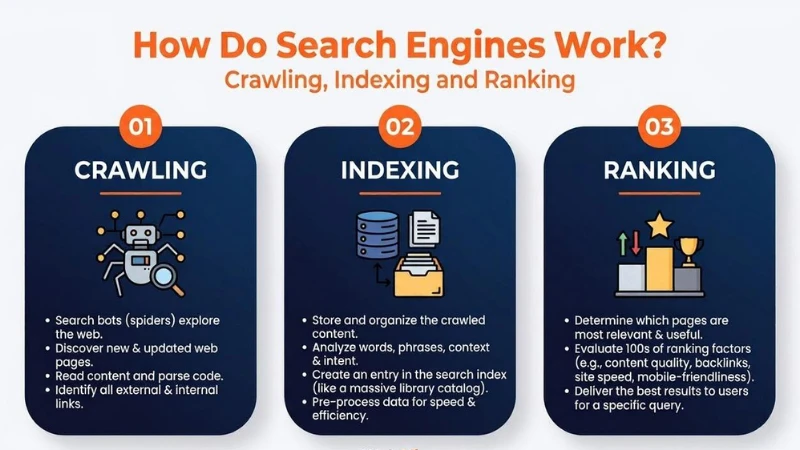
Search engines work through three stages: crawling, indexing, and ranking. Each stage directly determines whether your web page appears in Google search results and where it ranks. Google controls roughly 91% of the global search engine market, making it the primary focus of any SEO strategy.
What Is a Search Engine?
A search engine is a system that stores information about web pages and retrieves the most relevant results when a user submits a query. It runs on two core components that work together.
i. The Index and the Algorithm
The search index is a large database of web pages Google has discovered, processed, and stored. The search algorithm is the program that matches a user’s query to the most relevant pages in that index. Search engines display two types of results: organic results, which are ranked by the algorithm and cannot be paid for, and paid results, where advertisers pay per click (PPC). This PPC model is how search engines generate revenue. Understanding this distinction matters because only organic results are determined by the quality and relevance of your content. SEO is the practice of improving a page’s visibility in those organic results.
| Component | Function |
| Search Index | Stores discovered and processed web pages |
| Search Algorithm | Matches user queries to relevant index results |
| Organic Results | Ranked by algorithm; cannot be paid for |
| Paid Results (PPC) | Advertisers pay each time a user clicks |
How Do Search Engines Work?
Search engines work through three primary functions:
- Crawling: Googlebot scours the internet for content, reading the code and content of each URL it finds.
- Indexing: Google stores and organizes the content found during crawling. Once a page enters the index, it is eligible to appear as a result for relevant queries.
- Ranking: Google provides the content that best answers a searcher’s query, ordering results from most relevant to least relevant.
Each of these is covered in full in the sections below.
What Is Crawling in SEO?
Crawling is the discovery stage. Before a page can appear in search results, Google must first find it. Google uses an automated program called Googlebot to do this.

i. How Google Discovers New Pages
Googlebot starts from a list of known URLs and follows the links on those pages to find new ones. There are three main discovery methods: backlinks from already-known pages, XML sitemaps that list your site’s URLs, and URL submissions made directly through Google Search Console. Crawl frequency depends on site authority, how often content is updated, and overall site structure. Established, frequently updated sites are crawled more often than new or rarely updated ones.
ii. What Is Crawl Budget?
Crawl budget is the number of pages Googlebot will crawl on a site within a set timeframe. For small sites, this is rarely a problem. For large sites with thousands of pages, a wasted crawl budget means important pages may not get crawled in time. You protect your crawl budget by fixing redirect chains, removing duplicate URLs, and avoiding URL parameters that generate multiple versions of the same page without unique content.
iii. What Blocks Crawlers from Your Pages?
Robots.txt is the primary file used to control crawler access. It lives at yourdomain.com/robots.txt. If Googlebot finds the file, it follows its instructions. If the file is missing, Googlebot proceeds to crawl the site. If it cannot access the file at all, it will not crawl the site. Avoid listing private page URLs in robots.txt as this publicly exposes their location. Use a noindex tag instead for pages you want hidden from search results. Beyond robots.txt, several other issues prevent Googlebot from reading your content. A technical SEO audit can surface these blockers before they affect your rankings.
| Blocker | Why It Matters |
| Robots.txt disallow | Tells Googlebot not to access the URL |
| Login wall | Crawlers cannot log in to access content |
| Search forms | Bots cannot submit queries to find pages |
| Text inside images | Text embedded in images may not be read or indexed |
| JavaScript-only navigation | Links in JS menus may not be followed |
| Redirect chains | Multiple redirects may cause Googlebot to stop before reaching the page |
What Is Indexing?
Once Googlebot finds a page, Google processes it and decides whether to store it in its index. Being crawled does not guarantee being indexed. These are two separate decisions Google makes independently.
i. What Gets Stored in the Search Index?
Google’s index stores over 100,000,000 gigabytes of data across servers worldwide, according to Google’s own documentation. For each URL, it stores the keywords used on the page, the content type, how recently it was updated, and data about how users have previously interacted with it. This stored data is what Google searches through when a user types a query, returning results in under one second.
ii. Processing and Rendering
Before a page is indexed, Google renders it. Rendering means Google runs the page’s code the way a browser would, to understand how it actually looks to users. During this step, links are extracted and content is read. A page must be successfully rendered before it can enter the index. Pages that rely heavily on JavaScript for content loading may face delays because Google processes JavaScript in a separate queue, which can take days or weeks longer than standard HTML content.
iii. Why Some Pages Are Not Indexed
Not every crawled page enters the index. You can check which pages Google has indexed by typing site:yourdomain.com into Google. For a precise status on individual pages, use the URL Inspection tool inside Google Search Console. The cached version of a page shows exactly what Googlebot last read from it, which helps diagnose rendering issues.
| Reason | What It Means |
| Noindex tag | Page explicitly excluded from the index |
| 404 error | Page not found; removed from the index |
| 5xx server error | Server failed to respond to Googlebot |
| Robots.txt block | Googlebot could not access the page to evaluate it |
| Login wall | Googlebot cannot pass authentication to read the page |
| Redirect chain | Too many hops; Googlebot may stop before reaching the page |
iv. How to Control Indexing with Meta Directives
Robots.txt controls whether Googlebot can crawl a page. Meta directives control what Google does with the page after it has been crawled. This distinction matters: Googlebot must be able to crawl a page to read its meta directives. If you block crawl access in robots.txt, Google cannot see the noindex tag either. The three most common directives are listed below.
| Directive | What It Does | When to Use |
| noindex | Excludes the page from search results | Thin, duplicate, or internal-only pages |
| nofollow | Stops link equity passing to linked pages | Used with noindex on gated or login pages |
| noarchive | Prevents Google from storing a cached copy | Pages where content changes frequently |
How Do Search Engines Rank Pages?
Once a page is indexed, it is eligible to appear in search results. Where it ranks depends on Google’s algorithm, which evaluates hundreds of signals to determine which pages best answer a given query.
i. What Search Engines Want
Google’s goal is to return the most relevant, useful result for each query. It adjusts its algorithm every day, with smaller quality updates happening continuously and larger core updates deployed periodically. Pages that clearly answer a searcher’s question perform better over time than pages built around outdated tactics like keyword stuffing. Google’s quality guidelines consistently point to one standard: does the content serve the reader?
ii. Key Google Ranking Factors
Backlinks remain one of Google’s strongest confirmed ranking signals. A backlink is a link from one website to another, acting as a vote of authority. A link from a trusted, relevant site tells Google that your page is worth referencing. Quality matters more than quantity. A few links from high-authority sites often outperform many from low-quality ones. This principle is the basis of Google’s original PageRank algorithm, named after co-founder Larry Page.
Content relevance determines whether your page matches what the searcher was actually looking for. Google evaluates keyword usage, content type, and whether the page fulfills the searcher’s task, not just whether it contains the right words. Freshness is a query-dependent signal. Searches for recent events or new products favor recently updated pages. Evergreen topics like how-to guides are less sensitive to publication date.
Page speed is a confirmed ranking factor that works as a negative signal: it penalizes the slowest pages without giving extra credit to the fastest. Since 2019, Google has used mobile-first indexing, meaning it reads and ranks pages based on their mobile version. A page that works well on desktop but poorly on mobile will rank based on the weaker mobile experience. Engagement signals such as click-through rate, dwell time, and pogo-sticking act as a feedback layer on top of objective signals. Google uses this click data to refine the order of results for specific queries over time.
| Ranking Factor | How It Works |
| Backlinks | Authority signal; quality matters more than quantity |
| Content Relevance | Keyword match and fulfillment of searcher intent |
| Freshness | Stronger signal for time-sensitive queries |
| Page Speed | Penalizes slow pages; not a reward for fast ones |
| Mobile-Friendliness | Google indexes and ranks using the mobile version (since 2019) |
| Engagement Signals | Click-through rate and dwell time adjust SERP order over time |
iii. How Google Personalizes Results
Two users searching the same query can see different results. Google uses location to return nearby results for queries with local intent. It uses language to rank localized content versions for users who search in different languages. It also uses search history to adjust results based on prior behavior. Users can opt out of search personalization through their Google account settings, but most do not.
What This Means for Your Website
Every stage of how search engines work has direct, actionable implications. Make sure your important pages are crawlable and not blocked by robots.txt, login requirements, or broken redirects. Submit an XML sitemap through Google Search Console so Googlebot has a clear map of your site. Fix 4xx and 5xx errors that cause pages to drop from the index. Keep your site navigation consistent between mobile and desktop. Build content that directly answers the questions your audience searches for, and earn backlinks from relevant, authoritative sites in your niche. Check your indexed pages regularly using the URL Inspection tool to catch issues before they affect your rankings. For hands-on guidance, Rejish Shrestha provides SEO services in Nepal covering everything from technical fixes to content strategy.
See How Search Engines Work in 5 Minutes
This short video walks through the three-stage process covered in this post, a useful visual reference if you want to reinforce what you have just read.
Conclusion
Search engines find pages through crawling, store them through indexing, and order them through ranking. Each stage is a filter your page must pass before it can appear in front of a searcher. SEO is the practice of making sure your site supports all three stages: accessible to crawlers, valuable enough to index, and relevant enough to rank.
Frequently Asked Questions
What does crawl mean in SEO?
Crawling is the process by which Googlebot discovers new and updated pages on the web by following links and reading XML sitemaps. It is the first stage in how search engines work, before a page can be indexed or ranked.
What is the difference between crawling and indexing?
Crawling is the discovery stage where Googlebot visits and reads a page. Indexing is the storage stage where Google decides to add that page to its searchable database. A page can be crawled without being indexed if Google determines it does not meet quality or relevance standards.
How long does it take Google to index a new page?
There is no fixed timeframe. Google can index a new page within a few days for established sites, or several weeks for newer or lower-authority sites. Submitting the URL through the URL Inspection tool in Google Search Console can speed up the process.
Can I check if my page is indexed by Google?
Yes. Type site:yourdomain.com into Google to see an approximate list of your indexed pages. For precise page-level status, use the URL Inspection tool in Google Search Console. The cached version of a page shows what Googlebot last read from it.
What are the main Google ranking factors?
Confirmed ranking factors include backlinks, content relevance, freshness, page speed, mobile-friendliness, and engagement signals such as click-through rate and dwell time. No complete public list of all ranking factors exists as Google has not disclosed every signal.
Does page speed affect search engine rankings?
Yes. Page speed is a confirmed Google ranking factor. It works as a negative signal, penalizing pages that load slowly rather than rewarding the fastest pages. Google’s Core Web Vitals are the primary metrics used to measure page speed performance.
How do search engines make money?
Search engines generate revenue through pay-per-click (PPC) advertising. Each time a user clicks on a paid result, the advertiser pays the search engine. Organic results are free to appear in and are determined entirely by the algorithm, not advertising spend.